
Create a Footer Before Printing
Below we will look at a program in Excel VBA that creates a footer before printing a workbook. Create a Workbook BeforePrint Event. Code added to the Workbook BeforePrint Event will be executed by Excel VBA before you print a workbook. Open the Visual Basic Editor. Double click on This Workbook in the Project Explorer. Choose Workbook from the left drop-down list. Choose BeforePrint from the right drop-down list.
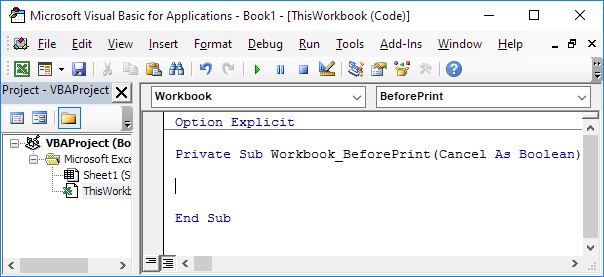
To create a footer, add the following code line to the Workbook BeforePrint Event:
ActiveSheet.PageSetup.LeftFooter = ActiveWorkbook.FullName
The PageSetup object contains all page setup attributes (left footer, bottom margin, paper size, left margin, and so on) as properties. Test the program by printing your workbook.
Result:
