Copy or Export this Code to VBA
Use these verified developer utilities to run this lesson directly inside your Microsoft Excel Visual Basic Editor.
Step Keyword
You can use the Step keyword in VBA to specify a different increment for the counter variable of a loop. Place a command button on your worksheet and add the following code lines:
Dim i As Integer

 For i = 1 To 6 Step 2
    Cells(i, 1).Value = 100
 Next i
Result when you click the command button on the sheet:
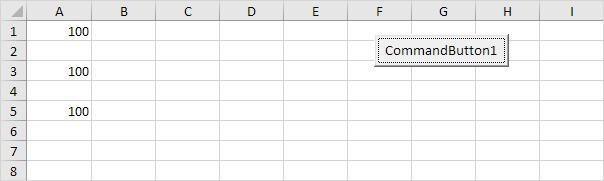
The code lines between For and Next will be executed three times. For i = 1, Excel VBA enters the value 100 into the cell at the intersection of row 1 and column 1. When Excel VBA reaches Next i, it increases i with 2 and jumps back to the For statement. For i = 3, Excel VBA enters the value 100 into the cell at the intersection of row 3 and column 1, etc.
Place a command button on your worksheet and add the following code lines:
Dim j As Integer

 For j = 8 To 3 Step -1
    Cells(6, j).Value = 50
 Next j
Result when you click the command button on the sheet:
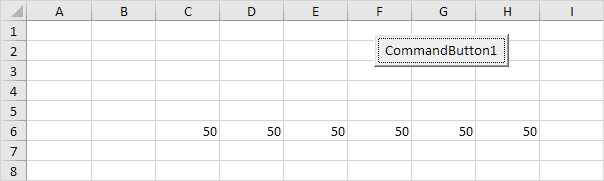
The code lines between For and Next will be executed six times. For j = 8, Excel VBA enters the value 50 into the cell at the intersection of row 6 and column 8. When Excel VBA reaches Next j, it decreases j with 1 and jumps back to the For statement. For j = 7, Excel VBA enters the value 50 into the cell at the intersection of row 6 and column 7, etc.
Stuck on a step? Ask a question and the AI answers using this article.