Copy or Export this Code to VBA
Use these verified developer utilities to run this lesson directly inside your Microsoft Excel Visual Basic Editor.

Remove Duplicates
Below we will look at a program in Excel VBA that removes duplicates.
Situation:
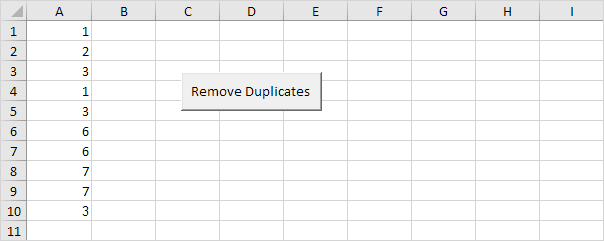
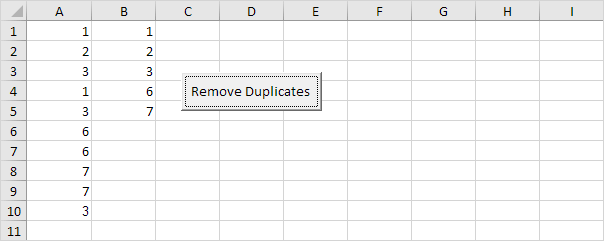
In column A we have 10 numbers. We want to remove the duplicates from these numbers and place the unique numbers in column B.
Declare four variables. toAdd of type Boolean, uniqueNumbers of type Integer, i of type Integer, and j of type Integer.
Dim toAdd As Boolean, uniqueNumbers As Integer, i As Integer, j As IntegerWrite the first number of column A to column B since the first number is always ‘unique’.
Cells(1, 2).Value = Cells(1, 1).ValueIinitialise two variables. We’ve just added one number to column B, so we initialise uniqueNumbers with the value 1. We set toAdd to True assuming that the next number needs to be added as well (this is not necessarily true of course).
uniqueNumbers = 1
toAdd = True
We need to determine whether the second number is ‘unique’ or not. This can be done in a very easy way. Only if the number is not already in column B, the second number needs to be added to column B.
We also need to check this for the third number, fourth number, and so on. We start a For Next loop for this.
For i = 2 To 10If the second number is equal to one of the numbers in column B (so far we only have one unique number), we set toAdd to False because in this case we don’t want to add this number! (it is not ‘unique’). At the moment uniqueNumbers is still equal to 1, but uniqueNumbers can be a whole list. To check this whole list, we need another For Next loop. Again: if the number we want to add is equal to one of the numbers in this list, toAdd will be set to False and the number will not be added. Add the following code lines:
For j = 1 To uniqueNumbers
    If Cells(i, 1).Value = Cells(j, 2).Value Then
        toAdd = False
    End If
 Next j
Only if toAdd is still True and not set to False, Excel VBA needs to add the number to column B. At the same time, we increment uniqueNumbers by 1 because we have one unique number more now. The following code lines get the job done:
If toAdd = True Then
    Cells(uniqueNumbers + 1, 2).Value = Cells(i, 1).Value
    uniqueNumbers = uniqueNumbers + 1
 End If
We will set toAdd to True assuming the next number (third number) needs to be added. Again this is not necessarily true.
toAdd = TrueDon’t forget to close the loop.
Next iPlace your macro in a command button and test it.
Result:
Stuck on a step? Ask a question and the AI answers using this article.