
Offset
The Offset property in VBA takes the range which is a particular number of rows and columns away from a certain range (border below for illustration only). Place a command button on your worksheet and add the following code lines:
Dim example As Range
Set example = Range(“A1:A2”)
example.Offset(3, 2).Select
Result when you click the command button on the sheet:
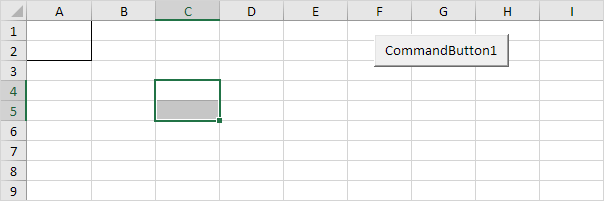
These code lines select the range which is 3 rows below and 2 columns to the right of Range(“A1:A2”). The Offset property always takes the top left cell of a range as the starting point.
From Active Cell to Last Entry
This example illustrates the End property of the Range object in VBA. We will use this property to select the range from the Active Cell to the last entry in a column.
Situation:
Some sales figures in column A. Assume that you will be adding more sales figures over time.
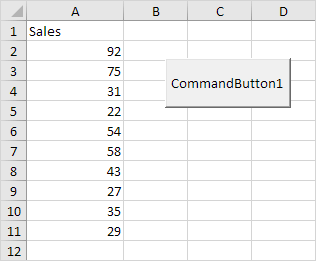
Place a command button on your worksheet and add the following code lines:
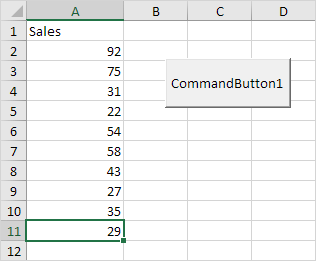
1. To select the last entry in a column, simply add the following code line:
Range(“A5”).End(xlDown).Select
Note: instead of Range(“A5”), you can also use Range(“A1”), Range(“A2”), etc. This code line is equivalent to pressing the END+DOWN ARROW.
Result when you click the command button on the sheet:
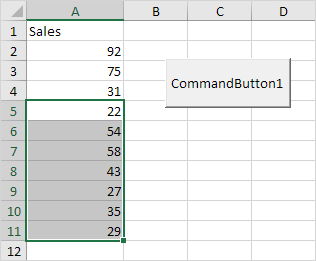
2. To select the range from cell A5 to the last entry in the column, add the following code line:
Range(Range(“A5”), Range(“A5”).End(xlDown)).Select
Result when you click the command button on the sheet:
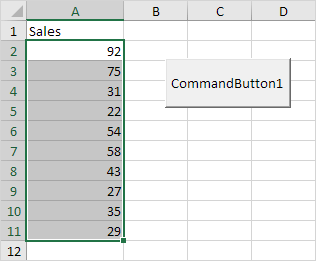
3. To select the range from the Active Cell to the last entry in the column, simply replace Range(“A5”) with ActiveCell.
Range(ActiveCell, ActiveCell.End(xlDown)).Select
Result when you select cell A2 and click the command button on the sheet:
You can use the constants xlUp, xlToRight and xlToLeft to move in the other directions. This way you can select a range from the Active Cell to the last entry in a row.
Stuck on a step? Ask a question and the AI answers using this article.